Thursday, August 09, 2007

HD Green Screen Test

It works. Not like it's supposed to, probably, but I figured something out. I usually do. I did some poking around Internet forums and some playing around with my video editing program, Adobe Premiere Pro, and eventually found a way to generate the QuickTime movie below.

Don't judge the on-camera performance too critically. Speaking extemporaneously is not one of my gifts. There was no script, though I did have my laptop with the thumbnails of the photos nearby for reference. That's what you see me looking down at periodically. I did edit parts out where I talked too long about things I didn't have pictures of. That cut the running time from almost 15 minutes to just over nine.


I was also able to burn a DVD and to create a Windows Media File, which is a smaller file size but looks better than the QuickTime movie. I'll post that here when I get chance.

For more on the controversial history of Big Cat Rescue and its founder, check out this article in the St. Petersburg Times.

Trial and Errors

I finished the HD green screen test last night. Unfortunately, I haven't figured out how to show it to you yet. Let's see if I can explain this.

My HDV camera shoots frames that measure 1280 by 720 pixels. That's what I see in my Adobe Premiere Pro video editing program. If I use only video shot with that camera, it's fine. You can see that in the first HD test I posted.

But this time, I used an animated background and photographs of different dimensions. When I import them into Premiere Pro and add them to the video timeline, I can get them properly framed in the monitor window. Within the program the video plays in its proper 16:9 aspect ratio and looks like it should, as the still frame capture below shows.
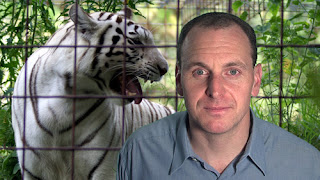

The problem comes when I try to export the finished movie. When I export it as an AVI file, look what happens:
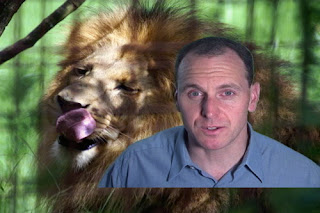

Instead of the 16:9 ratio, it creates a video file that's 4:3. Worse, it shows parts of the background photo that are supposed to be cropped just like in the first still frame capture. Back on the original HD test, I couldn't tell there was a problem because there was no background (or foreground, in the instances where I cover my face with a photo or video) so when creating the AVI file the extra space above and below the frame showed up black -- the so called "letterboxing" effect.

Premiere Pro has encoding software for other formats so I tried some. Flash video (FLV) would be great, that's the most easily viewed by Internet browsers, so it would work better here than the QuickTime movies I usually use. So I tried that.
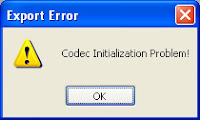

Oops. That's not good. I noticed that in the place where I want to save the Flash file I'm creating, it makes the file but adds a ".mov" end the end of the file name. Something like this: "HDGreenScreen1.flv.mov" which is obviously not right.

What about QuickTime? That seemed to work. I could adjust the dimensions so that it would create a 16:9 file. Great! But when I played the QuickTime movie, the audio and video came unsynched about a minute or so into it. By two to three seconds. It did not seem to get progressively worse as the file played. The audio began lagging suddenly and stayed the same distance behind for the rest of the movie. The video turned white when the last video frame ended as the audio kept going.

I made a Windows Media file but that had the same problems as the AVI. I exported the movie as an MPEG2 file but the file it created had a .m2t suffix that my computer didn't recognize. I tried to burn a DVD from the timeline but it would create only a 720x480 size, not only the wrong aspect ratio but much smaller than the 1280x720. And it didn't shrink the video to fit in the frame, it simply cropped it.

This is a long-winded way of saying that I've got some research to do before I can show you how well (I think) my green screen test worked. I'd look in my Adobe user guide but it's not really helpful. They want you to buy the tutorial. It's not enough to pay for the program. Adobe wants you to pay again if you want to learn how to use it.

Tuesday, August 07, 2007

Rendering

I shot my HD green screen test last night and hoped to have a clip for your visual consumption by now but rendering the green screen effects plus photographs takes FOREVER!

Here is a still frame:

Click on the image to see a larger version.

Total time for the project is about 11 minutes right now and I've completed about 4:30 of that. There could be more cuts as I go. But if I have enough pictures to cover my rambling recollection of my trip to Big Cat Rescue, I'll let it go. If I can't be self-indulgent on my own blog, where can I?

Monday, August 06, 2007

Big Cat Rescue

I plan to do a green screen test in HD soon. When I do, I'll talk more about the tour of Big Cat Rescue I took Saturday. It's a sanctuary for big cats retired from roadside acts or people who thought they'd make cool pets only to realize they don't.

The organizaton's web site BigCatRescue.org features bios of the animals it houses. The site also has information about its guided tours. The place is not without controversy, as outlined in a St. Petersburg Times article.

Because it was created to serve as a sanctuary for the cats rather than as a venue to display them, it's not a great place to go if you're primarily interested in taking photographs. I took almost 170 pictures when I went. The fencing gets in the way of most of them.

As you can see for yourself:

Sunday, July 29, 2007

Inevitable

"Good putt," my dad said after I made an 8 footer to finish the tenth hole. I had splashed my tee shot into the water, hit my next shot into a sand trap, flubbed the sand shot and got to hit another one before finally sinking the putt.

"Hit enough shots," I said, "and one of them's bound to be good."

Saturday, July 28, 2007

HD Camera Test


I've had my JVC GY-HD110 camera for several months but not until last night had I attempted to shoot anything HD with it. In this brief test the camera was connected directly to my computer via a firewire cable so it's not quite the same thing but it's enough to see that the computer can see the camera and can take video from it in HDV.

The lighting stinks and I didn't even mic myself up. I just used sound from the "shotgun" mic attached to the camera. That's why it sounds so tinny. You can see the 16:9 aspect ratio shoots a much wider frame (hence the black bars at the top and bottom).


Next task will be to try a green screen test.

Wednesday, July 11, 2007

Big Room Boom

Sit down, start playing along to Big Room Boom, look up and two hours have passed. I tried guitars, keyboards, bass. Some I knew immediately wouldn't fit the song but I happily played along anyway, looping the main track so that I could repeat it over and over. That's why it's called playing music.

I did add a bass track using my synthesizer, which might be hard to hear depending on your sound system. There's also a melody guitar. I might add more to it but I like the background track so much I can listen to it by itself for hours at a time. Don't worry; you don't have to sit through it that long. The song runs only about two-and-a-half minutes.

Big Room Boom (V.5)

In other news, our Jumbo Shrimp oxymoron award of the day goes to our friendly neighborhood IT department at work.

We got a note today at work from IT notifying us (as notes often do) that it was upgrading our e-mail service. Among "the benefits that you will realize are: Improved Performance of Outlook and the Network." Great! Although, come to think of it, I can not remember ever having any problems. Then after the list of instructions we have to follow to activate our updates, the e-mail says, "Once the Outlook service is activated, you may notice small delays in sending and receiving emails. This is normal and expected." (Underline emphasis NOT my addition.)

Our new and improved e-mail service will run more slowly than the old one. Benefits?

Monday, July 09, 2007

Weekend Wrap-Up

Saturday I had to complete shooting on a story for WEDU (backstory here). We had done the principal interviews earlier and shot nearly three hours of video of guys working on and racing their radio controlled cars. This shoot wouldn't take all day.

Despite the large amount of video we shot and the interviewees all having good things to say, the story was still missing something. The problem is that I had three different voices articulating basically same view. They were all middle-aged guys who had a passion for racing these cars. That's fine for a 90 second typical TV news story. But the story would exhaust itself long before the allotted running time for a five minute feature.

We went back looking for at least one more perspective. We found one in a hobby shop about a half mile from the track. Its owner opened the store at that location primarily because of its proximity to the track. This was important because the racers I had interviewed talked about how the county's support for the track came in part because it would draw people to downtown Englewood. A business that sells supplies for racing at the track opening there would be evidence of that.

We also interviewed a fan. Attendance still didn't meet the expectations we had been led to have but there were enough people to show that there was at least a crowd of some sort. The fan we talked to verified that more people do watch the races when it's cooler out. She was also a woman, which gives us some variety of voices in the story.

I haven't seen the tapes of Saturday's shoot yet but I feel much better about the story now.

Sunday, with a mountain of laundry to tackle, I spent most of the day playing guitar.

Big Room Boom

The tune above is a work in progress. I got the drums from the Sony Acid Music site. The free Acid project includes sound loops. Drums is where many of my recent tunes have started. I get the drums going, start playing along, keep going until a stumble across something I like than try to record it.

Pulse

Pulse is a simple tune (not like any of mine are terribly intricate) that provides a bed for me to play lead guitar over. I have another version that is much slower and I kept the same smooth lead guitar sound. The faster version might work better with a more distorted lead guitar.

Funky Mood Five

Funky Mood Five is the latest attempt to play the lead guitar part more precisely. This version also has a slightly different mix, with the synthesizer a little louder and the guitar toned down some.


Good Times With Nuge (V.4)

This one is also an attempt to tighten up a song I have posted here before. The differences are subtle but when you play something over and over again, you make little tweaks in how it goes and, I hope, play it a little better.

Friday, July 06, 2007

Lowry Park Zoo


My cat usually makes a poor subject for my photographic endeavors, though I managed to get this shot of her shortly after I bought my new Sony A100 digital SLR camera. Looking for a place to practice, I went to Tampa's Lowry Park Zoo July 4. See a sample below.


I was disappointed with the zoo, though some of the letdown was probably my own fault. The middle of a July afternoon in Florida is not when animals wearing fur coats are going to be at their most active. None of the big cats made a public appearance.

The aviary was a highlight. You just go into a big caged room and you can get face to face with the birds, called lorikeets. They're native to Australia, according to the sign inside the aviary. If you bribe them with nectar (sold for $2 for a tiny cupful), they'll happily lap it up while sitting on your hand. Their comfort with humans was how I got so close to them.

The bald eagle shot I took from farther away than it may appear. I cropped a lot of it out to feature his head. The young chimpanzee appeared to be taste testing bird droppings on the rock. The gecko was not a zoo exhibit. The place is crawling with them.